Oura Ring Size · Independent Sizing Resource · Updated August 2026
Open the Oura app, tap the battery icon in the top corner, and use the Locate feature — it shows your ring’s last known location on a map and can guide you closer using Bluetooth signal strength. One important thing to know going in: this isn’t real-time GPS tracking, and understanding that difference will save you some frustration.
How Oura’s Locate Feature Actually Works
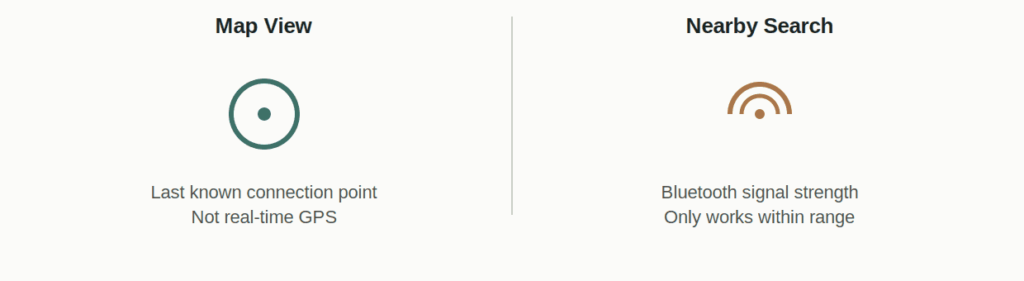
Locate has two distinct capabilities. Map view shows where your ring was located the last time it successfully connected to your phone — not necessarily where it is right now. Nearby search uses Bluetooth signal strength to guide you closer once you’re physically near the ring, similar to a metal detector rather than a live tracking dot.
Important: Your Ring Doesn’t Have GPS
This trips people up more than anything else about the feature. Oura Ring has no GPS chip — the location shown in the app is based on your phone’s last successful Bluetooth connection to the ring, not the ring’s own real-time position. If you left your phone at home and lost the ring somewhere else, the map will show wherever your phone last connected to it, not where the ring actually is now.
If the map location and where you actually think you lost the ring don’t match, trust your own memory over the timestamp — the app is showing you the last connection point, which isn’t always the same place or time you last saw the ring physically.
Step-by-Step: Using Locate
Make sure Location Services are enabled for the Oura app in your phone’s settings, and confirm your phone isn’t in low battery mode, since Locate won’t function if it is. Open the Oura app, go to the Home tab, tap the battery icon in the upper-right corner, then select your device to see its last known location on the map. If you’re physically near where the ring might be, switch to nearby search and move around slowly — the signal strength indicator gets stronger as you get closer.
What If the Ring’s Battery Died?
If the ring itself has run out of charge, Bluetooth-based nearby search won’t work at all, since the ring has no power to broadcast a signal. In that case, the map view showing its last known connection point is the only information you have to work with — there’s no way to locate a fully dead ring beyond that last recorded location.
Third-Party Finder Apps
A few independent apps exist that use Bluetooth signal strength more precisely than Oura’s own nearby search, marketed specifically for locating a misplaced ring under furniture or in tight spaces. These aren’t affiliated with, endorsed by, or sponsored by Oura Health Oy, so treat any location or battery-life claims from them with the same scrutiny you’d apply to any third-party app requesting Bluetooth access.
If You Reported It Lost and Got a Replacement
If you’ve already reported a ring lost and received a replacement, be aware that the original ring may be disabled when paired with a new device, as a protective measure for your account. If you find the original ring after replacing it, don’t expect it to necessarily reconnect the same way it did before.
A ring that’s easy to keep track of starts with good daily habits — see our care and protection guide for routines that reduce how often it ends up loose in a bag or gym locker in the first place.
Frequently Asked Questions
Does Oura Ring have GPS tracking?
No. It has no GPS chip. The Locate feature relies on your phone’s last known Bluetooth connection point and nearby Bluetooth signal strength, not real-time satellite tracking.
Why does the map show the wrong location for my ring?
The map shows where your phone last connected to the ring via Bluetooth, which isn’t necessarily where the ring is right now, especially if time has passed or you’ve moved since that last connection.
Can I find my Oura Ring if the battery is dead?
Not through nearby search, since a dead ring can’t broadcast a Bluetooth signal. The last known map location is the only information available in that case.
Do I need a subscription to use the Locate feature?
Locate is generally tied to having an active Oura Membership. Check your current plan status if the feature doesn’t appear available.
This guide is published by Oura Ring Size, an independent sizing resource not affiliated with, endorsed by, or sponsored by Oura Health Oy. “Oura” and “Oura Ring” are trademarks of Oura Health Oy, referenced here only to describe compatibility. Feature availability and behavior may change — confirm current functionality directly with Oura’s support resources.